
We recognised that we had a problem with the way customers renewed licences.
RealVNC make remote access software. After many years of requiring customers to manually reapply a licence key each year, RealVNC had introduced a new subscription and licensing mechanism, whereby customers could sign in using an online portal to renew their licence, and this would ensure that the software (VNC Connect) installed on any of their computers would be re-licensed automatically, as long as:
- The computer running the software was connected to the internet,
- The customer had used their account credentials to activate the software on that computer (rather than a licence key).
There were two particular downsides to applying a licence key manually, as I discovered by talking to some customers and internal stakeholders.
- We had designed a web portal for the customer to manage payment for the new licence, and even allowed them to set up auto-renewal for the following year. However, if they hadn’t made the switch from manually applying a licence key to applying account credentials when installing the software, then the software would not be associated with their account, and thus not be automatically renewed. So yes, we could take their money seamlessly, but they still had to jump through some hoops to manually apply a licence key otherwise the software would stop working.
- If customers were manually applying licence keys instead of signing in to join a computer to their account, then RealVNC had no visibility of those computers in terms of their key metrics, i.e. numbers of installations and active users.
Now, there were valid cases where applying a licence key was preferable, or the only feasible option, i.e. if the computer wasn’t connected to the internet. However, many of the users that were applying licence keys manually didn’t need to. It would be easier for them, and better for RealVNC, if they used their account credentials to licence the software.

Identifying a potential cause
I started by looking through the onboarding process to find the point where customers applied the licence to the software. When they set up the software, they must run through a licensing wizard. Looking at the first screen of the wizard revealed a good opportunity for improvement. The screen offered a set of 3 options:
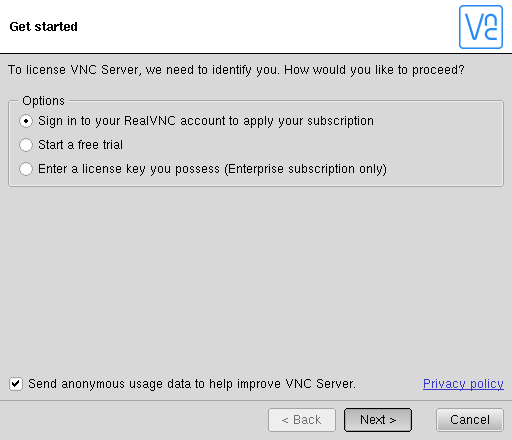
- Sign in to your RealVNC account to apply your subscription
- Start a free trial
- Enter a license key you possess (Enterprise subscription only)
The first two options started the same flow (i.e. ‘sign in’). The third made a strong association between having an Enterprise subscription (our most popular) and entering a key. I thought that this could be steering too many people toward the wrong option. I needed to validate this assumption, so I ran a small user test where I asked people to run through this wizard. In the scenario I told them that they had an Enterprise licence. My assumption was validated as it seemed that the wording was steering people with an Enterprise licence toward that third option.
New design
I proposed a simple redesign of the screen to promote signing in as the primary action.
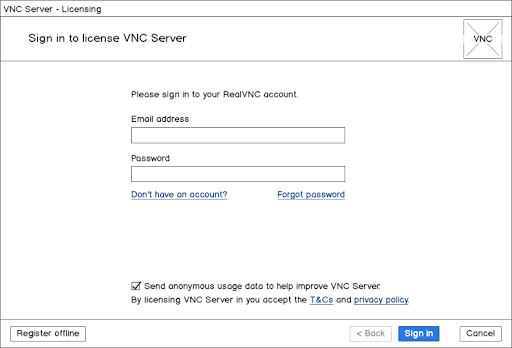
As the licence key option was now intended only for those users that couldn’t, or wouldn’t, connect their computer to the internet, I demoted that option in the UI. To help strengthen the message, and to decouple it from any one type of licence, I changed the button label to better describe the scenario where this option is needed – “Register offline”. I tested this with a new set of users, and was satisfied that it had the desired effect. So we decided to go ahead and implement the change.
How are we going to measure this?
RealVNC were tracking a metric called ‘Registered servers’. This metric showed the number of instances of their ‘VNC Server’ (part of VNC Connect) software that had been licensed by the customer signing into their account. We had no metric for the number of licence keys applied manually.
By moving this metric, it would show that the new screen was steering more people in the right direction, towards sign-in and away from licence keys. I decided to look specifically at people starting new 30-day trials, as this would include predominantly new customers, with no existing bias toward applying the key. Therefore they would take this new screen at face value.
The impact
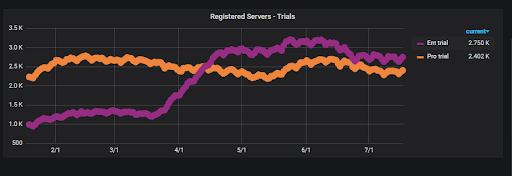
This change went live in the software in March 2019. Looking at a graph of trial software registrations, it’s clear to see the impact. Online registrations for Enterprise subscriptions almost tripled in the space of a month. Not only did this please our Business Analyst, but it meant all of those new customers signing in to licence their software would face much less friction when it came to renew their licences in a year’s time.
 Mark Boxall